Ready to learn how to start your first blog? This post is an easy to follow, step-by-step tutorial on how to get your blog up and running! It will only take a few minutes, and you’ll be ready to start posting on your blog as soon as you’re done.
I’ve been a blogger for many years now. Since starting, I’ve become my own boss, learned valuable skills that I can offer (SEO, navigating wordpress, writing web content, etc.), used my blogging skills to land freelance writing jobs and so much more!
If you’re dreaming of…
- Being your own boss (or even just having a great side gig)
- Leaving the 9-5 lifestyle
- Writing about things you enjoy
- Helping others with your blog content all while getting paid for it
- Working from any location you want (as long as you have internet and a laptop)
…Then you’re in the right place!
Of course, it goes without saying that you should be determined and ready to learn the ins and outs of blogging so you can create your successful home business! It’ll all work out as long as you put in the effort.
DISCLOSURE: I am an affiliate for Bluehost, which means I will receive a commission if you sign up for Bluehost through my affiliate link at no extra cost to you.
The very first step I recommend everyone to take is to set up a blog the right way, which you’ll be able to do easily by following the steps in this post.
Before we get started, I just want to answer a question that’s often burning in people’s minds…
Is it too late to start a successful blog in 2021?
The answer is NO! It’s definitely not too late to start a successful blog. There are many blogs out there, both old and new, who are currently killing it in the blogging world. Take your fears about starting a blog and throw them out the window!
Like I said earlier, you’ll be able to create a successful blogging business as long as you’re determined and willing to work on your blog.
Be sure to read until the end of this post because I wrote up a simple, 3-step guide that’ll teach you exactly what you need to do to actually succeed and make money once your blog is all set up!
Alright! Let’s get started on the tutorial…
How To Start Your First Blog
1. Choose a hosting service
Creating self-hosted blog using a hosting service is necessary if you want to make money with your blog. I recommend going with Bluehost.
Here’s what you get when you create your blog with Bluehost:
- FREE domain name for your first year (AKA your URL. Mine is passiveclover.com)
- FREE SSL Certificate (This means that your blog is safe and secure for people to visit)
- 1-Click WordPress Install (Bluehost will install WordPress for you so you don’t have to go through any manual steps)
- 24/7 Support (I’ve always had great experiences talking to their support team!)
- Creating a self-hosted blog with Bluehost means that YOU own your blog (Essential if you want to make money with your blog)
- 30-day refund guarantee if you decide it’s not for you (Be sure to contact Bluehost’s support team if you need help with anything!)
You may be aware that you can sign up for a free blog using websites like Blogger, however I would NOT recommend this if you want to turn your blog into a business. Here’s why:
- You’re not the owner of a free blog. Sure, you have your own login info and you write the content, but the blog is actually owned by the website you created it with. This means that they can shut you down at any point if they want. When you use a hosting service, your blog belongs to YOU.
- It’s much harder to monetize a free blog. Although you can monetize a free blog, most affiliate programs, ad networks and companies won’t want to work with a free blog because they just don’t look as professional as a self-hosted blog. This brings me to my next point…
- Free blogs look very unprofessional. As silly as it may sound, something as simple as your own “.com” domain helps you look much more professional than something like “domain”.blogspot.com. Plus, you have way more options for great looking themes when you have a self-hosted blog. Having a self-hosted blog helps you look trustworthy to your visitors as well as people and brands who you may want to work with.
2. Sign up for Bluehost

Since we’ll be using Bluehost in this tutorial, head on over to the Bluehost sign up page.
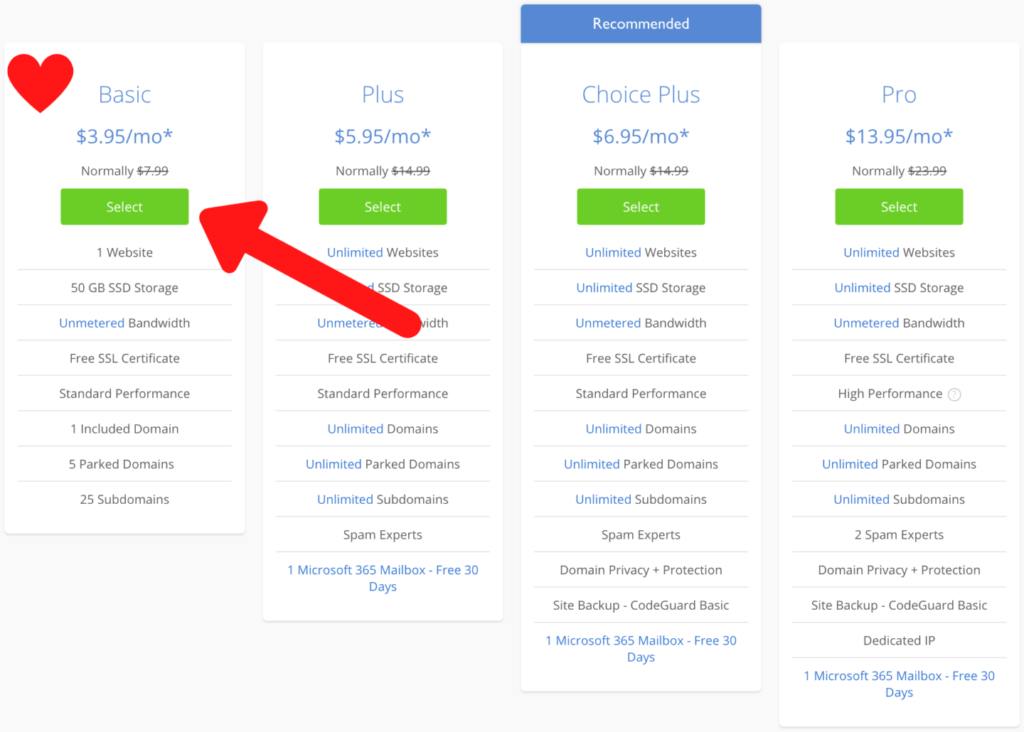
The first thing you need to do is choose a plan that’s right for you. I recommend going with the “Basic” plan! This is the cheapest option and it has everything you need to get started. You’ll get it for just $3.95/month!
The Basic plan allows you to have one website, so you’ll have to pick any of the upgraded plans after Basic if you want unlimited websites (you’ll still only get one free domain).
You can always upgrade later if you decide you want the features that other plans have to offer. Basic will work perfectly fine for now.
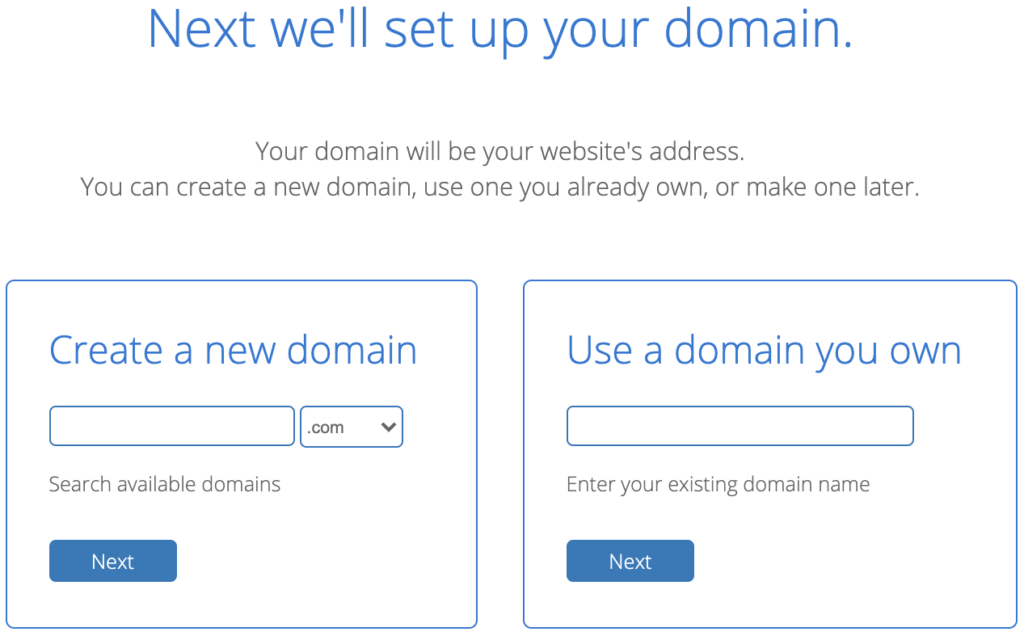
Next, you get to create your FREE domain! Your domain is the name of your website. For example, mine is “passiveclover.com”. I would recommend picking something short and easy to read.
I would also recommend ONLY using a .com domain. This is the default selection when you register your domain on Bluehost, so simply type the name you want and click next.
There is a drop down menu that gives you the option to choose .net, .org and others, but it’s best not to get any of these. Just go with a .com domain because it looks the most professional!
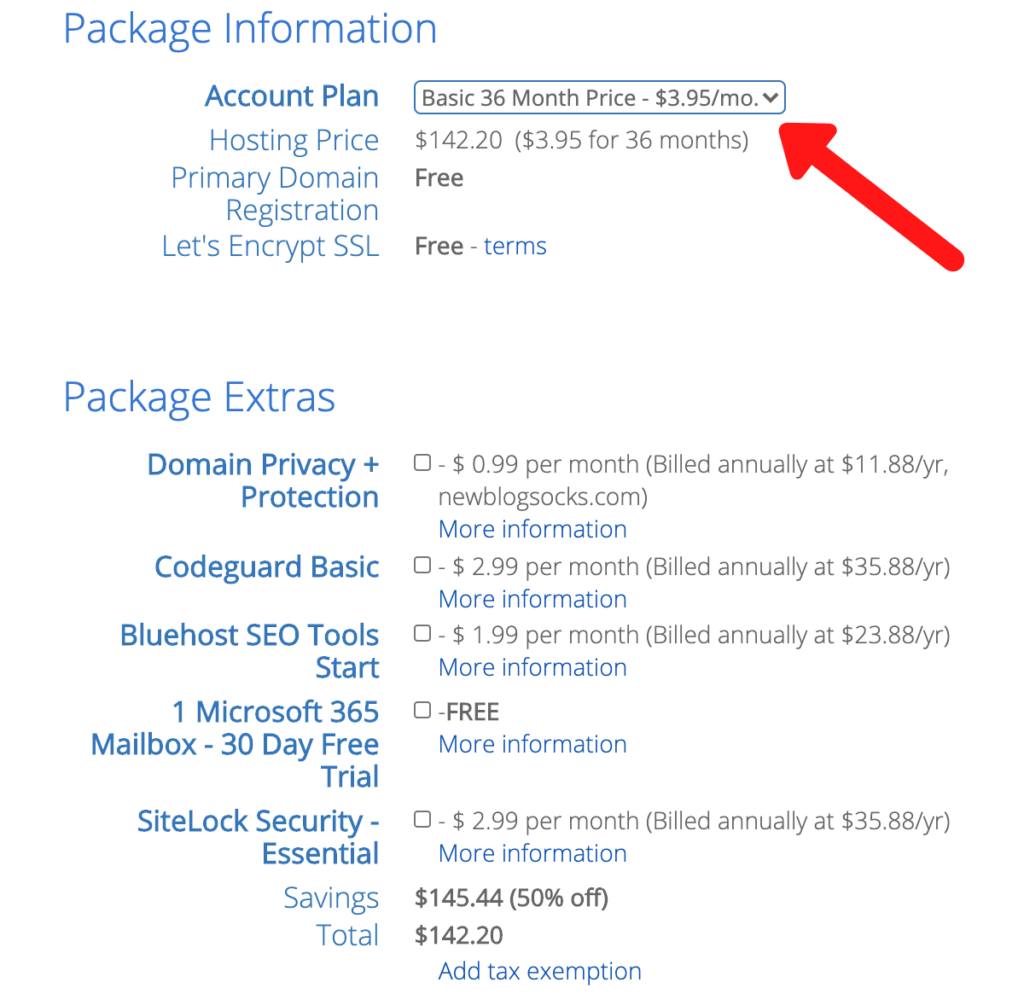
Now that you’ve chosen your domain, it’s time to check out! You’ll be taken to the page where you put in your account information, choose your account plan and any extra add-ons you want.
You’ll notice that you can choose your account plan under the “Package Information” section. If you want the BEST deal, go with the 36 month plan. This way, you’ll pay the lowest price and you wont have to worry about renewing your blog for 3 years.
They also offer a 24 month and 12 month plan. The price goes up a little when you choose a plan with fewer months, but the deals are still great! The 12 month plan is perfect for anyone who wants to try out blogging but isn’t completely sure if it’s right for them yet.
Next, you’ll see options for add-ons under “Package Extras”. I would recommend getting Domain Privacy + Protection and SiteLock Essential Security. However, these are optional and not necessary for starting your blog.
3. Create your WordPress blog
WordPress is THE BEST platform for blogging. Thankfully, Bluehost will install WordPress for you with the click of a button so you don’t have to go through any manual steps like you might with other hosting services.
Once you’ve finished purchasing your Bluehost plan, you’ll be taken to a page where you can choose a theme for your blog. Feel free to choose one or scroll to the bottom and click “Skip this step” if you want to pick a different theme (you’ll be able to look through more free and paid themes once you’re in your WordPress account).
Once you’re done either picking a theme or clicking “Skip this step”, click the link that says “go to my Bluehost account”.
You’ll be taken to your Bluehost Portal and you’ll see a big blue button that says “Log In To WordPress”. Click that button to go to your WordPress account!
You now have your hosting and WordPress account all set up. Super easy, right?
4. Choose a theme
You can skip this step if you decided to choose a theme while signing up for Bluehost. Otherwise, you’ll want to install a theme next.
You can either purchase a premium theme or use a free theme from WordPress. Premium themes can be found on websites like ThemeForest or by searching around for one you like on Google. However, there’s no need for a paid theme when you’re just starting out. You can always purchase a theme later!
How To Find A Free Theme
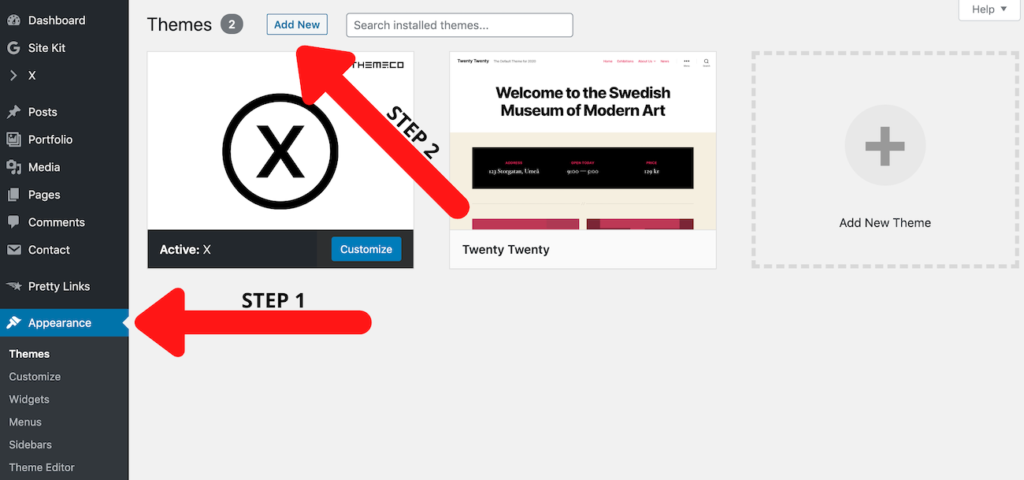
To find a free theme, click on “Appearance” on your WordPress sidebar, then “Add New” on that page. Here, you’ll see tons of beautiful WordPress themes you can install for free! Click the “Install” button when you find one you like.
How To Upload A Theme You Purchased
If you decide to purchase a theme, follow the first steps in the above picture by clicking “Appearance” on your WordPress sidebar, then “Add New” on that page.
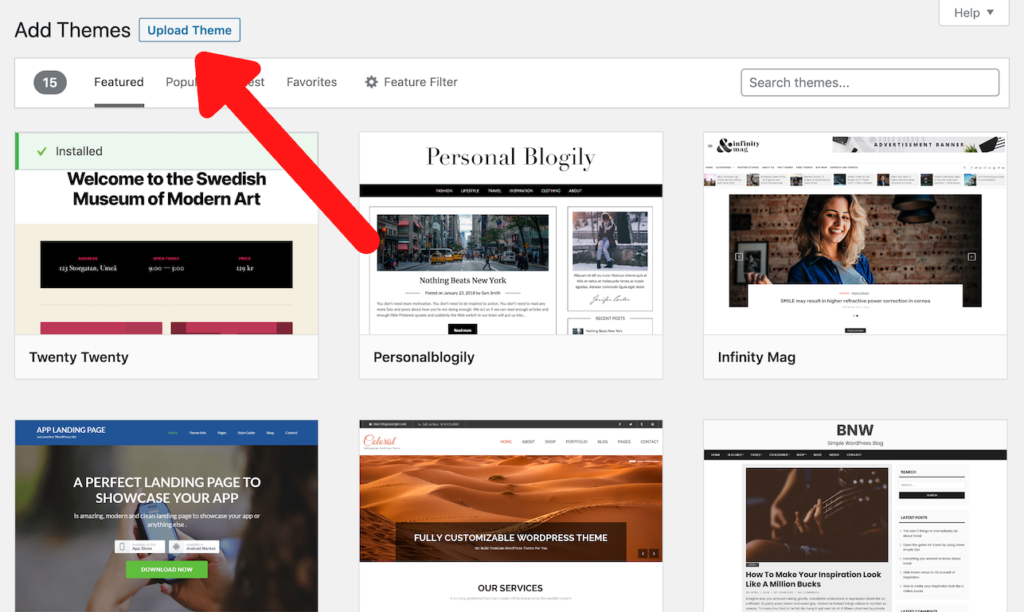
Then, click “Upload Theme” and upload the .Zip file you received when you purchased your theme. Click “Install Now” and you’re good to go!
5. You’re all set! Now do this…
Congratulations, you have your blog all set up! So… Now what? What are the main things you should be working on to succeed as a blogger?
I’m going to give you a simple, 3-step guide so you know exactly what you should be doing. Following these steps will set you on the right path so you can start earning money with your blog ASAP.
1. Publish content
Once you have your blog all set up, the most important thing to do is to PUBLISH BLOG POSTS!
New bloggers often feel intimidated by the thought of writing blog posts and try to procrastinate doing so. They get caught up in doing things that won’t move them forward such as editing their theme or finding all the right plugins. Don’t fall into this trap!
Having perfectly coordinated colors and pretty fonts on your blog isn’t what’s going to attract readers and make money. It’s the CONTENT that will!
Aim to get about 20-30 high quality blog posts up on your blog at the start. About 1,000+ words per blog post is a good goal to have, but don’t be too worried if you can’t quite reach it.
Not sure what to write about? Here’s how to avoid writer’s block…
First of all, think about your niche and the people who are looking for information in your niche. What questions do they have? What products would be useful to them? What tips would make their lives easier? Could beginners in your niche benefit from “How To” style blog posts (like the one you’re reading)?
Think about these questions and write down some ideas. Trust me, once you get going, you won’t be able to stop! There are tons of things you can write about. I’ll give you an example.
Let’s say I have a blog in the sewing niche. Here are some blog posts I could write:
- Basic hand stitches every beginner should know
- How to avoid pricking your fingers while hand stitching
- Top sewing machines for beginners
- Best budget-friendly sewing machines
- How to fix a thread jam in your sewing machine
…I could go on and on and on!
What do my sewing blog post ideas all have in common? Each topic will HELP the reader!
You can be sure that you’ve written a great blog post as long as it’s helpful and provides valuable, easy-to-understand information that your readers can benefit from.
2. Monetize your blog
Now that you’ve written a few good blog posts, it’s time to monetize your blog so you can start making money!
There are several different ways to make money as a blogger, but I would recommend affiliate marketing for beginners.
Other monetization methods such as display ads or sponsored posts often require you to have a certain number of monthly readers. This may be difficult for a beginner to qualify for. Thankfully, there are tons of affiliate programs out there that don’t have any monthly traffic requirements.
So, what is affiliate marketing anyway? Affiliate marketing is when you link to certain products or services using a personalized affiliate link. If someone clicks that link and buys the product or service, you get paid a commission!
One of the most popular affiliate marketing programs for beginners is Amazon Associates. With Amazon Associates, you can link to just about any product on Amazon. If someone clicks your link and purchases something within 24 hours, you get paid!
The great thing about Amazon Associates is that not only will you get paid a commission if your reader purchases the specific product you linked to, but you’ll also get paid for anything else they buy on Amazon!
Even if your reader doesn’t buy what you recommended, you may still earn a commission for their shopping list from that day. It’s happened to me several times!

If Amazon Associates doesn’t seem like the right affiliate program for you, don’t worry. There are tons of affiliate programs out there. Go onto google and search “*Your Topic/Product* affiliate program” and you’ll surely find programs you can apply for.
Remember to check the qualification requirements when applying to affiliate programs.
While many affiliate programs are beginner friendly, you still have to make sure your blog is up to their standards.
For example, Amazon Associates wants you to have original content on your blog that doesn’t include anything violent, explicit or deceptive (A few good blog posts will be just fine).
Amazon will also want you to have an affiliate disclosure on your blog stating you are a participant in their affiliate program. It can look like this: “*YOUR BLOG NAME HERE* is a participant in the Amazon Services LLC program, an affiliate advertising program designed to provide means for sites to earn advertising fees by advertising and linking to Amazon.com.”
You can copy that text and paste it onto your blog. I would recommend placing it in your footer or sidebar.
Now you know the basics of affiliate marketing, but how do you correctly apply it to your blog posts?
The best way to get people to click your affiliate links is by placing them in blog posts that provide help, solutions or answers to your readers!
Let’s say I have a sewing blog and I’m writing a blog post on the basics of how to use a sewing machine. In that post, it would make perfect sense to include affiliate links to my top recommended sewing machines that are easy to use for beginners.
Be helpful and give your readers a REASON to click the affiliate links! This will be much more effective than just randomly placing affiliate links around your blog.
3. Promote your blog
Okay, so you have some good blog posts on your blog and you’ve monetized them so you can actually make money. Now you need readers!
Here are a few FREE ways you can get your blog out there and attract readers:
- SEO
- Forums/Groups
- Social Media
- Guest Blogging
…And more!
I’ll give you a quick breakdown of each method, but I would recommend focusing on SEO and Pinterest as a beginner.
SEO
SEO stands for Search Engine Optimization. This means targeting a certain keyword/keyphrase in your blog post so that your post gets picked up by Google (plus other search engines) and hopefully pops up on the first page of google when you search that keyword/phrase.
Going back to our sewing blog example, let’s say I’m writing a blog post about the best budget sewing machines for beginners. I’m going to target the keyphrase “best budget sewing machines”.
I’ll try to include this phrase in the title of my blog post, as well as a couple of times within the actual blog post. Hopefully the search engines will recognize that my blog post is helpful for people searching “best budget sewing machines” and move my post to the first page of the search engine!
It usually takes a few months for blog posts to start showing up on the top pages of Google/search engines, so it’s not a quick way to get readers to your blog. But it can be a VERY good way of getting traffic, so I would highly recommend doing some research on SEO and implementing it into your blog posts from the beginning!
Pinterest
Pinterest is a great way to get readers to your blog ASAP.
Pinterest users are often specifically searching for sources that are going to help them or provide the information they’re looking for. This makes it a fantastic source of traffic for bloggers!
Learn to make beautiful, standout pins for your blog posts and pin them onto your boards. Websites like Canva and Picmonkey have Pinterest templates that you can use to easily design your pins.
I would recommend making multiple pins for each of your blog posts. That way, if one doesn’t get as much attention as you hoped it would, maybe another one will! Plus, doing so will help you get a better understanding of the types of pins that perform well and the ones that don’t.
Be sure to create a business account when you sign up for Pinterest. It’s completely free and it will allow you to see helpful information such as how well each of your pins are performing.
If you want a full course to learn all the ins and outs of Pinterest, check out Pinteresting Strategies. I was able to take my Pinterest views from almost nothing up to the thousands in just a few WEEKS after implementing what I learned in this course!

Forums/Groups
Depending on your niche, you can join relevant forums or Facebook/social media groups and promote your blog there.
Be careful with this though. Some forums and groups don’t allow users to self-promote! Check the rules to make sure you’re allowed to before linking your blog.
If you ARE allowed to, don’t just spam comments and posts telling people to go check out your blog. No one will like that!
Instead, get involved in the discussions people are having and answer the questions they’re asking. Help them out and show that you know what you’re talking about.
When appropriate, let them know that you go more into detail on the subject on your blog and give them a link to your blog post that talks about the particular subject. This will be much more appreciated than spam comments!
Social Media
You can create social media pages for your blog on websites like Twitter, Instagram, Facebook, etc.
Keep in mind that as a beginner, social media pages may be more work than rewarding.
Social media pages are typically used to connect with your readers once you have a more established following, so it may be a little difficult to get people to pay attention to your accounts when you’re just starting out.
That said, feel free to make your social media pages! I would just recommend focusing more on SEO, Pinterest and even forums/groups for better and quicker traffic as a beginner.
Guest Blogging
Guest blogging is when you write a blog post for another blog. The owner of the blog will typically provide an introduction to you and your blog as well as links to your blog and other social media.
This can be helpful for networking and getting your blog out there and in front of new, potential readers.
I wouldn’t recommend doing this as a beginner though. When you’re starting out, the most important thing is that you get a lot of good content up on YOUR blog… Not on someone else’s!
So unless you really love writing, I would recommend waiting until your blog is a little more established before you try guest blogging.
That’s how to start your first blog!
You made it to the end… Yay!
I know how daunting starting a blog can be, so I truly hope this guide helped you get a solid idea of what you need to do and work on.
Here’s a quick summary of how to start your first blog:
- Choose your domain and create your WordPress blog with Bluehost
- Choose a theme for your blog
- Publish helpful blog posts (aim for 20-30 to get going)
- Monetize your blog (affiliate marketing is great for beginners)
- Promote your blog (SEO and Pinterest are great places to start)
Let me know if you have any questions. I’d love to help you out and give you extra tips if needed.
Happy blogging!